


EvTrack
Web Services API · Webhooks

EvTrack REST API and Webhook Integration

Connect visitor management and access control to the systems you already run.

EvTrack opens its visitor management and access control platform to your own software in two ways. The REST Web Services API lets your systems create and manage visitors, people, credentials and reference data in EvTrack. Webhooks work in the other direction: EvTrack tells your systems the moment a visit or registration changes.

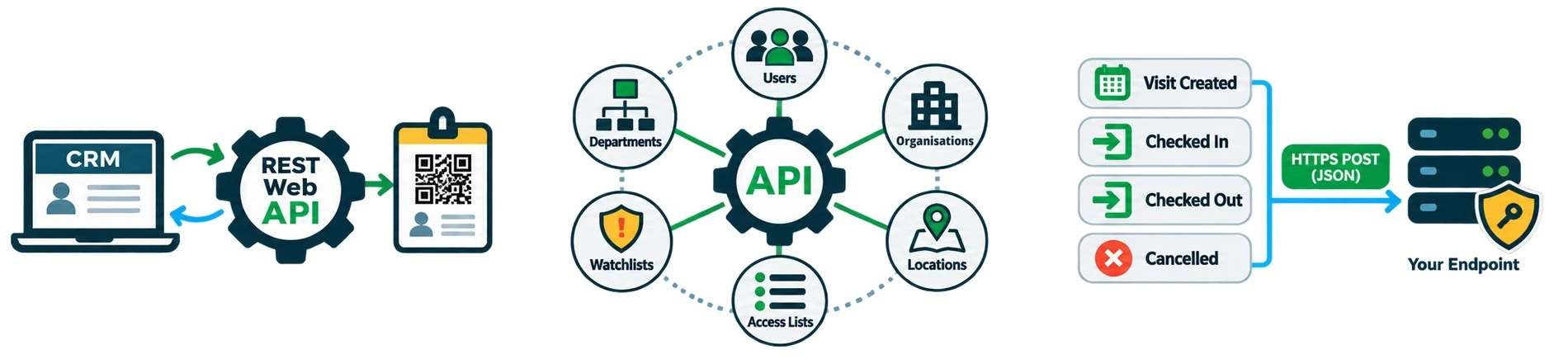
Three ways EvTrack integrates: a CRM calling the REST Web API to issue a QR visitor pass, the API keeping users, organisations, departments, locations, watchlists and access lists in step, and visit events posted by HTTPS POST (JSON) to your endpoint

apiREST Web API

Pre-register visitors, manage invitations and temporary access credentials

hubEnterprise Integration

Keep users, organisations, departments, locations and watchlists in step, and read access control lists

webhookVisit and Registration Webhooks

Real-time events to your endpoint with optional HMAC-SHA256 signing

What You Can Do With the API

event_available

Invitations and visits

Create, update and cancel visitor invitations, move a visit through its statuses from expected to checked out, and read its events and current status.

assignment

Registrations

Read, create, approve and decline registrations, and send pre-registration invitations.

group

People and users

Create, update and search personnel and user accounts, with their groups and roles. Enable or disable a user.

badge

Credentials

Issue and manage what a reader recognises: RFID card, PIN, face, licence plate, QR code or mobile credential.

gpp_maybe

Watchlists

Maintain watchlists and their entries, and run a match check against them.

account_tree

Organisation data

Keep locations, organisations, departments, cost centers and visit reasons in step with your own systems.

lock

Access control

Read access control lists and access control points, trigger a point, and submit a card or QR code through the virtual reader interface.

photo_camera

Photos, files and vehicles

Upload a photo for a person, read photos and thumbnails, and manage vehicles.

Built for Secure Integration

key

API keys with permissions. Every call carries an API key. Each key is granted only the read and write permissions its integration needs.

dns

One key, one system. A key can only read or change records that belong to its own system.

fingerprint

No internal identifiers. Every record is addressed by a UUID. Internal numeric identifiers are never accepted or returned.

speed

Fair-use rate limiting. Requests are metered per API key, with a standard Retry-After response when a limit is reached.

webhookWebhooks

Real-Time Events to Your Endpoint

Add a Webhook app in EvTrack and enter an address for each event you want to receive. EvTrack then posts a JSON copy of the visit or registration to your endpoint whenever that event happens. An event with no address is simply not sent.

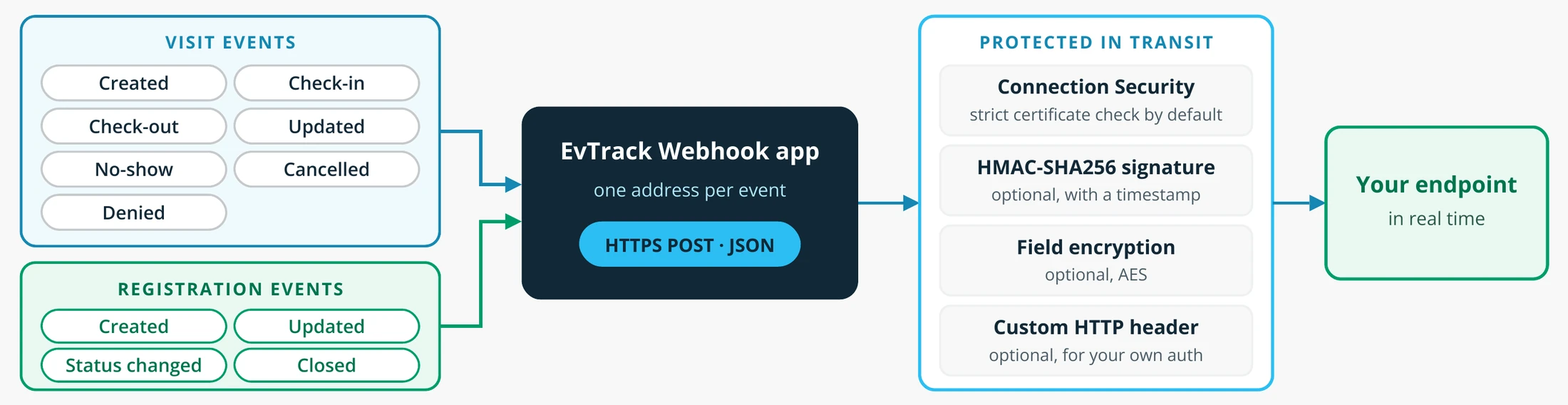
Seven visit events and four registration events feed the EvTrack Webhook app, which sends an HTTPS POST in JSON through Connection Security, an optional HMAC-SHA256 signature, optional AES field encryption and an optional custom HTTP header to your endpoint in real time

One app, eleven events. Seven visit events and four registration events. Each has its own address and is delivered over the connection security you choose.

Visit Events

Visit created

A visit is created: an invitation, a pre-registration or a walk-in.

Visitor check-in

The visitor checks in. The time of the first check-in is included.

Visitor check-out

The visitor checks out. The check-out time is included.

Visit updated

The visit is edited, or the visitor moves to on site, in parking or hosted.

Visit no-show

The visit is marked as a no-show.

Visit cancelled

The visit is cancelled.

Visit denied

The visit is denied. The reason is included when one was given.

Protecting Every Delivery

https

Connection Security. Choose how EvTrack connects. HTTPS with Strict Verification is the default for a new app and checks the certificate and host name of your endpoint.

verified

Signed requests. Add an HMAC key and every request carries an HMAC-SHA256 signature and a timestamp, so your endpoint can verify the sender and reject replays.

enhanced_encryption

Encrypted fields. Optionally encrypt personal, contact, credential and invitation fields with AES before they leave EvTrack.

http

Your own header. Optionally add a header of your own, such as an Authorization token, to every request.

codeFor Developers

Developer Portal

developers.evtrack.com carries step-by-step guides, the full API Reference and API Webhook Reference, and an API Explorer that runs real calls against your own system with your own API key. The portal is open to logged-in developers only.

Developer portal map: after portal login, guides cover the API overview, API key configuration, invitations and visits, registrations, people and credentials, reference data, files and media, and webhooks; references include the API Reference and API Webhook Reference; the API Explorer lets you try the Web Service API live from the browser
new_releasesRegistrations · From Release 3.90

Registrations in the API and in Webhooks

Integrations can now read, create, approve and decline registrations and send pre-registration invitations through the Web Service API, and a Webhook app can be told when a registration is created, updated, changes status or is closed.

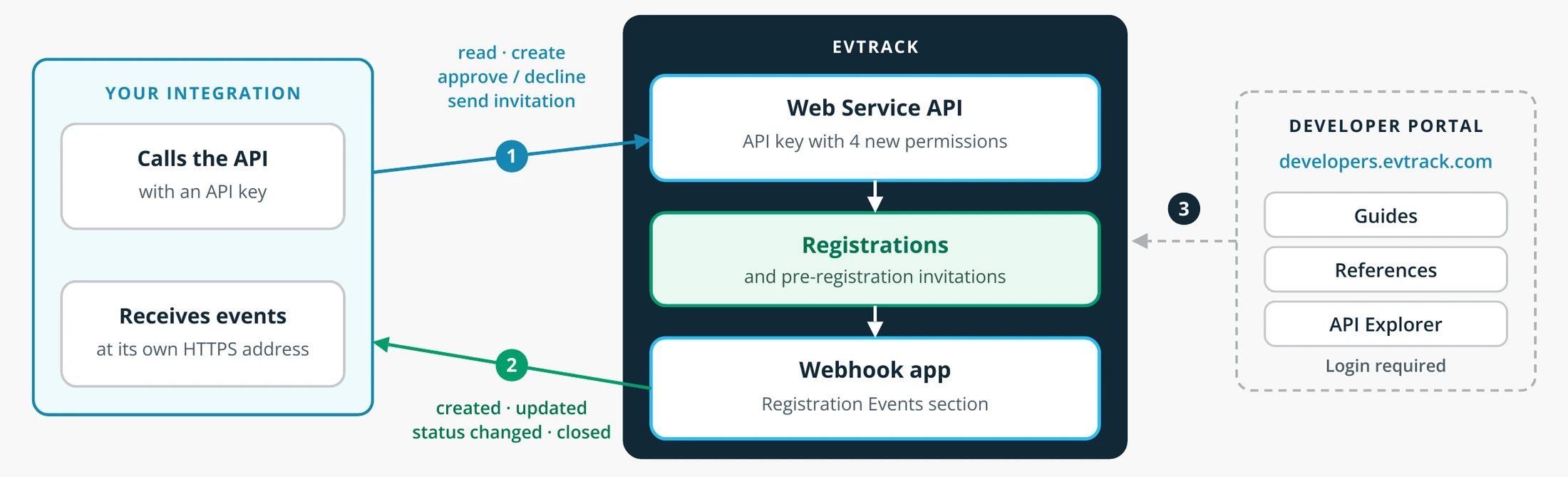
Your integration calls the EvTrack Web Service API with an API key to read, create, approve or decline registrations and send invitations; the Webhook app's Registration Events section sends created, updated, status changed and closed events to its HTTPS address; the developer portal at developers.evtrack.com provides guides, references and the API Explorer

How the new pieces fit together. 1 An integration calls the Web Service API with a key that carries the registration permissions. 2 A Webhook app tells it when a registration changes. 3 The developer portal documents both.

Four New Permissions on an API Key

Configuration › System Settings › Web Service API › Add

New permissionAllows
check_box_outline_blankRegistrations: readRead registrations
check_box_outline_blankRegistrations: writeCreate registrations
check_box_outline_blankRegistrations: approve and declineApprove or decline
check_box_outline_blankPre-registration invitations: sendSend invitations
  • ›Off until granted. All four are unticked on a new key.
  • ›Existing keys are unchanged. Earlier permissions stay as they were.
  • ›Token shown once, straight after saving.
  • ›Change them at any time by editing the key.

Four Registration Events on a Webhook App

Configuration › System Settings › Apps › Add › Webhook › Connection step › Registration Events

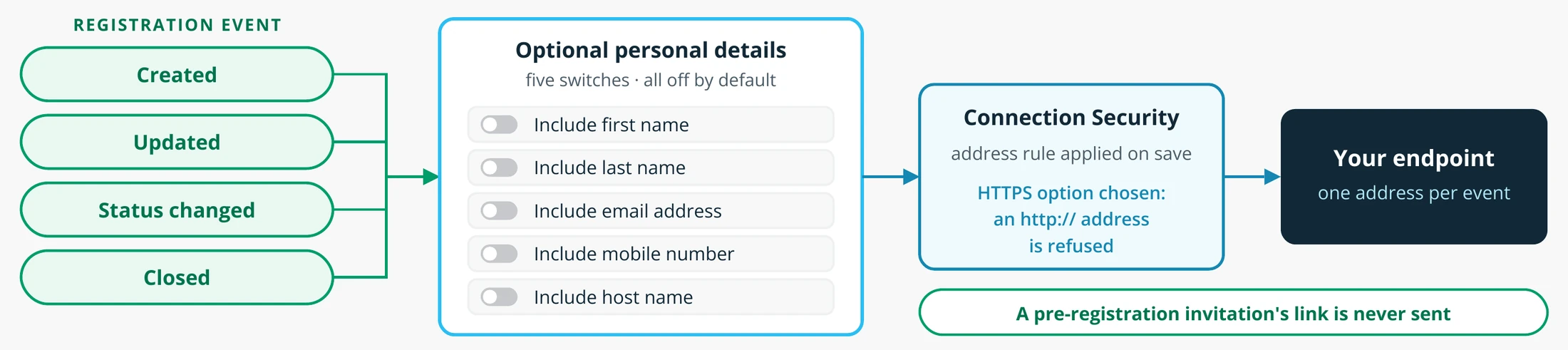
Registration events Created, Updated, Status changed and Closed pass through five optional personal detail switches (first name, last name, email address, mobile number, host name, all off by default) and Connection Security to your endpoint, one address per event; a pre-registration invitation's link is never sent

What the Connection step adds. Four address fields, one per event, and five switches that decide which personal details travel with an event. The same address rule applies as for visit events, and a Webhook app with no registration address keeps working for visit events only.

Good to Know

toggle_off

Nothing changes until you choose. Keys and Webhook apps set up before the upgrade carry on as they were.

visibility_off

Private by default. Registration events carry no personal details unless you switch each one on.

link_off

Invitation links stay private. A pre-registration invitation's link is never sent in a webhook event.

shield_lock

Least privilege. Four separate permissions, so a key is limited to exactly what its integration does.

integration_instructionsTypical Applications

Integrations in Practice

account_balanceGovernment

Issue a visitor pass only once an internal request has been approved.

schoolEducation

Record an arrival once and keep the school's learning platform up to date.

business_centerCorporate offices

Pre-register visitors from the CRM or booking system.

domainMulti-tenant

Let a tenant's own system pre-register its visitors and be told when they check in.

Integration in practice · Government ministry

Visitor passes straight from a ServiceNow approval

ServiceNow

A government ministry runs its internal requests in ServiceNow and its visitor and vehicle entry in EvTrack. The integration joins the two: when a manager approves a visit request, ServiceNow calls the EvTrack REST API, EvTrack creates the visit and returns a QR code, and ServiceNow emails that QR code to the requester.
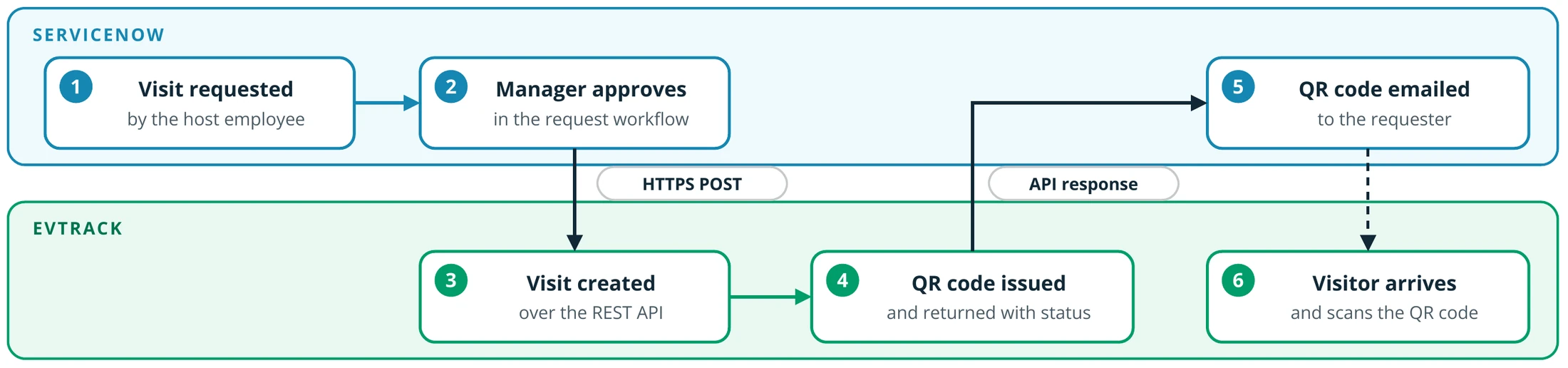
Six-step flow between ServiceNow and EvTrack: visit requested, manager approves, visit created over the REST API, QR code issued and returned, QR code emailed to the requester, visitor arrives and scans the QR code

ServiceNow sends

  • ›Visitor name, email and phone
  • ›Arrival time, purpose and host
  • ›Vehicle licence plate
  • ›The ServiceNow reference number

EvTrack returns

  • ›The QR code credential
  • ›A registration ID for later changes
  • ›A success or failure status

The result

  • ›No re-typing of approved requests.
  • ›Approved visitors only receive a QR code.
  • ›Immediate: emailed on approval.
  • ›Visits can also be updated or cancelled.

Integration in practice · School in Africa

Morning registration that fills itself in

Toddle

An international school in Africa uses Toddle as its learning management system. When a student registers in the morning, an EvTrack automation makes a webhook call to Toddle's attendance endpoint, an HTTPS POST with a bearer token, and the morning registration column in Toddle fills in by itself.

Three-step flow: student registers in the morning in EvTrack, EvTrack automation calls Toddle by HTTPS POST with JSON and a bearer token, morning registration is up to date in Toddle

EvTrack sends

  • ›The student's identifier in Toddle
  • ›The date of arrival
  • ›A "present" mark for the day

Toddle shows

  • ›The student marked present
  • ›In the morning registration column

The result

  • ›No second register to keep by hand.
  • ›Safeguarding: staff know who has arrived.
  • ›One place to look for teaching staff.

Ordering

Ordering part numberLicenceCovers
EVT-INTEGRATION-PEvTrack REST-API Integration LicenceAccess control or third-party REST-API integration. Perpetual licence, on-site server version.
EVT-INTEGRATION-WEBHOOK-PEvTrack Webhook Integration LicenceCustom API callbacks and event notifications.

Getting Started

  1. 1Create an API key
  2. 2Add a Webhook app
  3. 3Use the developer portal

support@evtrack.com · or ask your EvTrack partner

ServiceNow is a trademark of ServiceNow, Inc. Toddle is a trademark of its owner. They are named here to describe integrations; no endorsement is implied.

Ready to Streamline Your Visitor Management?

Join hundreds of organisations worldwide using EvTrack for secure, seamless access control.
